
Try DIY Software Recovery
If your drive is still recognized by your Mac and making normal sounds, data recovery software can often get your files back. Modern tools support APFS (Apple's current file system) on both Intel and Apple Silicon Macs running macOS Sonoma or Ventura. These tools scan your drive and recover deleted or lost files.
EaseUS Data Recovery Wizard
Tip: Most recovery tools let you scan and preview files for free before paying. Only buy if you see the files you need.
Windows user? Try MiniTool Power Data Recovery instead.
Professional Data Recovery
If your drive is making clicking sounds, isn't recognized, or suffered physical damage, you need a professional cleanroom recovery service. Do NOT try software recovery on a failing drive - you could make it unrecoverable.
DriveSavers - The Industry Leader
I've recommended DriveSavers for 20+ years. They've recovered data from drives that others said were impossible. Their cleanroom engineers work on drives for Apple, Google, and NASA.
Get Free Evaluation + DiscountPrevent Future Data Loss
Set Up Backups Now
After recovering your data, please set up a backup system immediately. Here's what I recommend:
- Time Machine - Built into macOS Sonoma and Ventura. Just connect an external drive and turn it on. Works seamlessly with APFS on M1, M2, and M3 Macs.
- Carbon Copy Cloner - Creates bootable backups. My personal favorite.
- Cloud backup - iCloud, Backblaze, or Dropbox for off-site protection.
The best backup strategy uses both local (fast recovery) and cloud (fire/theft protection). Read my full backup guide.
Need more storage? OWC (Other World Computing) has been my go-to for Mac storage upgrades, external drives, and docks for 20+ years. Quality hardware with excellent Mac compatibility.
About Dan
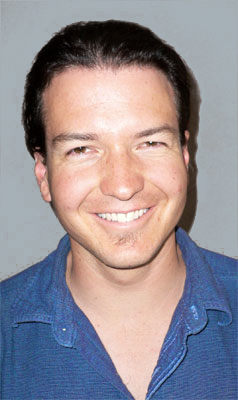
I'm Dan, the former "Berkeley Mac Guy." For 20+ years I helped thousands of Bay Area clients with their Macs - from startups to home users, from simple setups to disaster recoveries.
I no longer take client work, but I still believe in helping people recover from data disasters. That's why I maintain this resource site with the tools and services I trust.
When I'm not helping people find data recovery solutions, I'm a professional Spanish guitarist performing at weddings and events throughout the Bay Area. Learn more at danfries.us.

Privacy: This site uses Google Analytics to understand visitor behavior. No personal data is sold or shared.
Berkeley Mac Guy focuses exclusively on Mac data recovery, backup strategies, and storage solutions. All recommendations are based on hands-on testing with real Macs running current macOS versions (Sonoma, Ventura) on both Intel and Apple Silicon (M1, M2, M3) hardware. We evaluate tools for APFS compatibility, Time Machine integration, and practical reliability — not just feature lists.